Monday, August 15, 2016

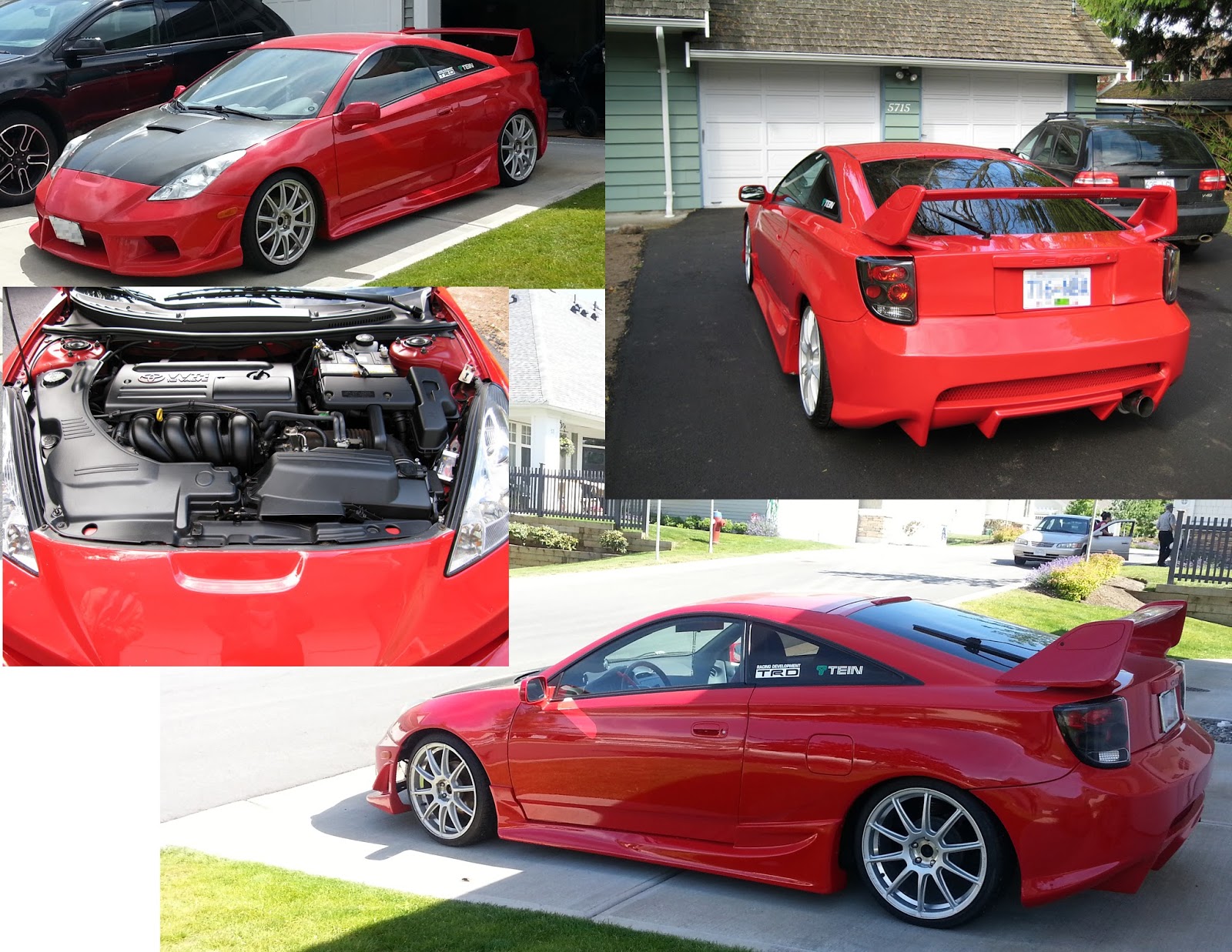
My Hard Earned Custom Ride


Not that many people would know that I love driving and that I love fast cars. I have been driving cars for 24 years since I was 12 years old and have a lot more street-sense and driving smarts than most people would estimate that I would. Some people choose to see me as this young, rich Asian guy behind the wheel and automatically think that I must be one of those fresh off the boat immigrants that probably drives like shit. Or maybe they think that I'm some spoiled brat who's mom and dad bought them an expensive, exotic car. Also because my car is high-profile and highly customized with aftermarket parts, I can always tell from people's reactions that they assume that I am some kind of drug dealer or involved in some kind of illegal activity to afford such a car. I'm happy to prove them wrong.

I earned this car with my own money. I didn't get any financial help from any parents or relatives and did it solo. It required alot of savings and effort from 9 years of hard work in I.T. and the computing field and living in an incredibly expensive city of Vancouver. If anyone thinks I came upon this car with any kind of ease then they need to be kicked in the face and told the truth. My car is a symbol of how hard I work and how far I've come. When I moved to Vancouver in the year 2000 after graduating college I had only $450 dollars in my pocket, a duffle bag of clothes and my home computer to start with. My vehicle is a very rare and ultra customized 2002 Toyota Celica GT/TRD (Gran Turismo Toyota Racing Development). I bought my car in April 2009 second hand and in great shape. I only added a few of my own touches to make it the piece of art that it is today. I bought it for roughly only $16,000 dollars and it was a really great deal. The car with the amount of aftermarket modifications could easily be worth $40,000 dollars.

I take my driving very seriously. I was taught to drive by my eldest brother Conrad before I was 12 years old in 1992. He took it upon himself and taught me to drive since our father passed away and lost his battle to cancer the year earlier when I was nearly 11 years old. I remember that my brother tricked me into driving when I really didn't want to. He said "let's go to the video store and rent a Nintendo game". We went to the video store and I got the game I wanted, and then we took a drive out to the highway headed to the United States border. We reached a quiet straight stretch of highway and he pulled the car over to the side and tells me to get behind the wheel or we're not leaving. That was the beginning of many lessons that would turn me into the smart driver that I am today. In retrospect, it may have been illegal to do that since I was not the driving age of 16 yet, but the back roads he taught me on were pretty much desolate and empty so there was no real danger for me or any other drivers.

Today I still obey traffic laws and I don't speed recklessly. I do respect other drivers and I refuse to drive like an idiot even when other drivers piss me off. I could outdrive many people if I needed to. I had three older brothers that enjoyed driving and I inherited a part of their leadfoot mind state. Instead of wreaking havok on the real road I actually enjoy taking out alot of frustration by playing alot of racing simulator games and even have the racing steering wheel and foot pedals for my XBOX 360.

Vehicle Specifications for my 2002 Toyota Celica GT/TRD:
Color: Glossy Candy Coat Red
Engine: 1.8L Variable Valve Timing (VVT-i) 16 valve 140 horse power
Transmission: 5-speed manual
(* indicates aftermarket add-on)

Interior:
- power locks + windows
- Air Conditioning
- red & black Suede leather seats,
- red & black leather wrapped steering wheel
- red & aluminum sport pedals
- red & black leather wrapped gear shift knob
- Broadway oversized rear view mirror *
- Audio Deck: Eclipse 7-inch touch screen DVD + MP3 with GPS Navigation *
- Audio enhanced JBL 10-inch subwoofer + felt bassbox *
- Alpine 3541 Audio Amplifier 140W *

Exterior:
Suspension: Tein lowering springs with 4-inch ground clearance *
Body Style: Celica 7th Generation TRD SSII fully loaded
Body Kit: BoMex Aero complete set front bumper, rear bumper + air diffusers, left and right sideskirts ****
Hood: Tanabe Carbon Fibre *
Headlights: Xenon HID *
Wheels: Falken Ziex 512 high-performance tires ****
Rims: Racing Heart Evolution 18-inch chrome x 4 ****
Exhaust: APEXi N1 chrome catback exhaust with silencer *

Additional Accessories:
- StreetGlow Red LED lights for tire valve caps
- red & black Toyota carry pouch
- USB plug adapter for cigarette lighter
- white title vinyl decals for aftermarket brands "BoMex" and "APEXi"
- grey car cover exterior protector
- Noco G3500 car battery tender and charger

Tuesday, August 2, 2016

Ultimate PC Configuration - Summer 2016

Here's an expert enthusiast hardware configuration for an Extreme Performance Gaming PC with some of the most current and best rated hardware components:

Computer case:
In Win 805 Infinity
=   $ 250.00

Power supply:
Corsair HXi Series 750W High-Performance ATX Power Supply
=   $ 230.00

Motherboard:
MSI Z170A Gaming M7 Motherboard
=  $ 330.00

Processor:
Intel Core i7-6700K 4.2GHz Quad-Core Skylake Processor
=    $ 460.00

Memory:
Corsair Vengeance LPX 32Gb DDR4 3600 MHz
=    $ 320.00

Video card:
Gigabyte GeForce GTX 1080 Extreme Gaming 1936 MHz superclocked
=   $ 960.00

Storage:
SanDisk X400 1TB M.2 Solid State Drive
=   $ 400.00

Monitor:
Acer Predator Z35 Curved IPS 200Hz Monitor
=  $ 1450.00


Ready for a throwback? Check out my very first blog article on Ultimate PC Configurations.

Sunday, July 10, 2016

Get Faster, Smoother Videos on YouTube and Twitch


I did some research into these IP address ranges..

Net range 173.194.0.0 - 173.194.255.255 is owned by Google (YouTube)

Net range 206.111.0.0 - 206.111.255.255 is owned by Amazon/XO Communications (Twitch)

These IP addresses are caching servers used for video streaming sites. They are congested and sometimes bandwidth is throttled on them to allow for more connections. Blocking these IP address ranges forces YouTube or Twitch to use a different caching servers that will deliver faster, and smoother video playback.

=================================================
Start -> Control Panel--> System and Security --> Administrative Tools > Windows Firewall With Advanced security.

- On the left side of the firewall window click on the "Inbound Rules" option.

- On the right side of the screen click on "New Rule..."

- Click on the "Custom" radio button and then click "Next>".

- Make sure the "All programs" radio is selected then click "Next>".

- On the protocol and ports options leave everything at its defaults and click "Next>".

- On the scope screen you will see two boxes the top one is for local IP addresses and the bottom is for remote IP addresses. In this scenario we are trying to block an outside (remote) IP from accessing anything on the server so we will need to add the IP address to this section only as it will not be a local IP address.

- On the bottom selection "Which remote IP addresses does the rule apply to?" Click on the radio button that says “These IP addresses”

- Click on the "Add..." button.

- Click on the second radio button "This IP address range". Enter either of these ranges.

For Twitch:
From 206.111.0.0
206.111.255.255

For YouTube:
From 173.194.0.0
To 173.194.255.255

- NOTE** You can only do one rule at a time. For me I only picked the Twitch IP range.

- Click "OK", click "Next>".

- Make sure you select the "Block the connection" radio button on the next screen and then click "Next>".

- Leave all of the options on the next screen checked. This will be sure to block the IP no matter the connection they are trying to use. Click "Next>".

- Name the rule on the next screen something you can remember in case you wish to remove or edit it in the future. Click "Finish" and thats it.

- Repeat the steps if you want to make a rule for YouTube. I found that my YouTube videos play smooth without any changes. If you do want to apply the rule for YouTube, You'll need to go through the steps for a new rule separately.

Tuesday, June 14, 2016

Video Game Streaming - Follow Me as "Phresh_Ninja79"


I'm venturing into unknown territory and will be trying my hand at Video Game Streaming. If you don't know what that is, it is when someone like me broadcasts their gameplay on the internet for others to view and and enjoy. Viewers can follow, or subscribe to the streamer to help them become more well known.

Help me out on my new journey and check out the links and hit the follow or subscribe buttons.

I'll be broadcasting on two main places:
1.)  Twitch - https://www.twitch.tv/phresh_ninja79
2.) YouTube - https://www.youtube.com/user/phreshninja

I've been an avid fan of Video Games my entire lifetime. Video Games are my true passion and have been my long time hobby on the side. I am a Gamer 4 Life.

Whether or not I'm successful at Video Game Streaming, I'll continue to do it to gain more fans and more loyalty and recognition during the long run. If it pans out and continues to be successful and generates some funding, I will add more interactive features later on like "Prize Raffles" and "Give-aways" etc.

Hope to see you all online, and don't forget, you can also follow me on other Social Media, such as:
Twitter [  @phresh_ninja 79 https://twitter.com/phresh_ninja79  ]
Facebook [  https://www.facebook.com/PhreshNewMedia ]
Instagram [  #phresh_ninja  ]

Peace!
Walt Jimenez (a.k.a. Phresh_Ninja79)

Tuesday, May 31, 2016

Phresh Consulting Fee Guide

Phresh Consulting Fee Guide

Most computer shops and repair services charge as high as $85/hr for on-site outcalls and $60/hr in-store.
Phresh New Media will only charge $50/hr for generic services or the following service prices:

$20 for data backup
$40 for PC Tuneups
$60 for virus/malware removal
$80 for Home Wi-Fi setup
$100 for home PC complete office setup
$120 for Windows OS installs/reformatting + re-installs
$140 for home PC complete home theatre integration setup (XBMC/Kodi video streaming)
** Various costs for hardware components and replacements

The first initial consult for new customers is 50% discount on services. Discount does not apply to hardware replacement parts costs.

Thursday, May 19, 2016

Download YouTube Videos Easily


Here's an easy way to download and save your favorite videos from YouTube.

step 1.) go the video page of the video you want to save.

step 2.) hilight the URL in the browser's top bar by clicking on it once and then copy it by pressing CTRL+C or right-clicking and selecting "copy".

step 3.) open a new tab by pressing CTRL+T and type in the URL http://www.clipconverter.cc

step 4.) click in the field where it says "Video URL to Download:" and then press CTRL+V to paste in the YouTube URL you copied in step 2.

step 5.) click the "continue" button and wait a few moments. It will detect the media.

step 6.) select your desired quality setting and select the small radio circle button, and then click the "start" button at the bottom and wait a few moments. It will convert the media.

step 7.) finally click  the "Download" button to save your video to your computer.

Friday, April 8, 2016

Ultimate PC Configuration - Spring 2016

Here's an expert enthusiast configuration for an Extreme Performance Gaming PC with some of the most current and best rated hardware components:


Computer case:
=   $ 400.00

Power supply:
=   $ 130.00

Motherboard:
=  $ 330.00

Processor:
=    $ 480.00

Memory:
=    $ 430.00

Video card:
=   $ 960.00

Storage:
=   $ 380.00
Startech Adapter Converter M.2 to SSD
=  $ 35.00

Monitor:
=  $ 1700.00


Ready for a throwback? Check out my very first blog article on Ultimate PC Configurations.